
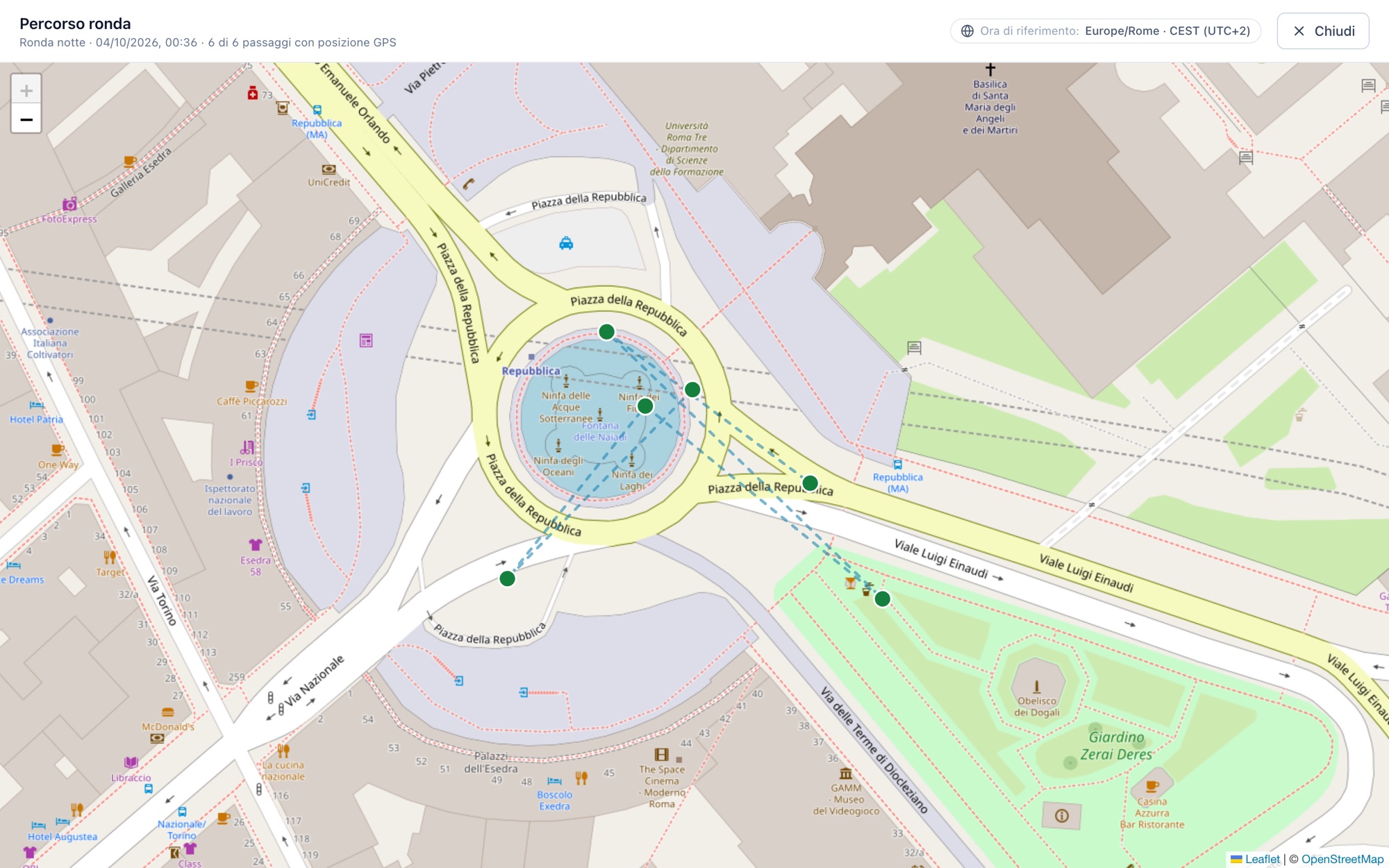
Every patrol leaves proof: where, when and who.
A sheet signed at the end of the shift asks you to trust it. ePatrol records every checkpoint with an NFC tag, time and position: the office sees a missed patrol straight away, and the client gets evidence instead of disputes.
Knowing the check was done, while it happens.
Anyone managing patrols and sites faces three problems every month. ePatrol closes them one by one.
A missed patrol comes to light at the end of the month, when the client disputes the service.
The alert arrives in seconds: missed patrol, uncovered shift, forgotten checkpoints.
A sheet signed at the end of the shift: the doubt remains whether the round was really done.
Every checkpoint has an NFC tag: time, position and who walked by are on record.
The client asks for proof, and the office copies sheets into Excel for days.
The report is already there, and the client sees the evidence on their own.
Trust rests on numbers and evidence.
With the client, with the office, with the people in the field: every patrol leaves where, when and who. The facts speak for themselves, and whoever did their job has already proved it.
Works with no signal
In basements, warehouses and underground floors the app keeps recording. As soon as the signal is back it sends everything by itself: no tag is lost, and the operator has nothing to remember.
Every stop is evidence
NFC tag, time and position for every point. If a tag is broken it is marked “not reached”, with the reason.
Team patrols
Several operators, one patrol: each signs the points they checked, with PIN or QR.
Corrections, in the open
Operators review sent patrols and, while the schedule allows, reopen and correct them. The office sees it was corrected.
The office knows at once
Patrol not done, uncovered shift, missing tags: the alert arrives in seconds, in the console, by email and on the phone.
Everything in one place
Patrols, shifts, attendance, issues, maintainers, documents and reports: one platform instead of five programs and ten spreadsheets. One login, the same data for everyone.
Data in Europe, clear rules
Servers in Europe, permissions per contract, a log of who did what, automatic deletion at the end of employment.
Speaks your team's language
Six languages, iPhone and Android, screens designed to be used in the dark and with one hand.
A patrol, from start to send
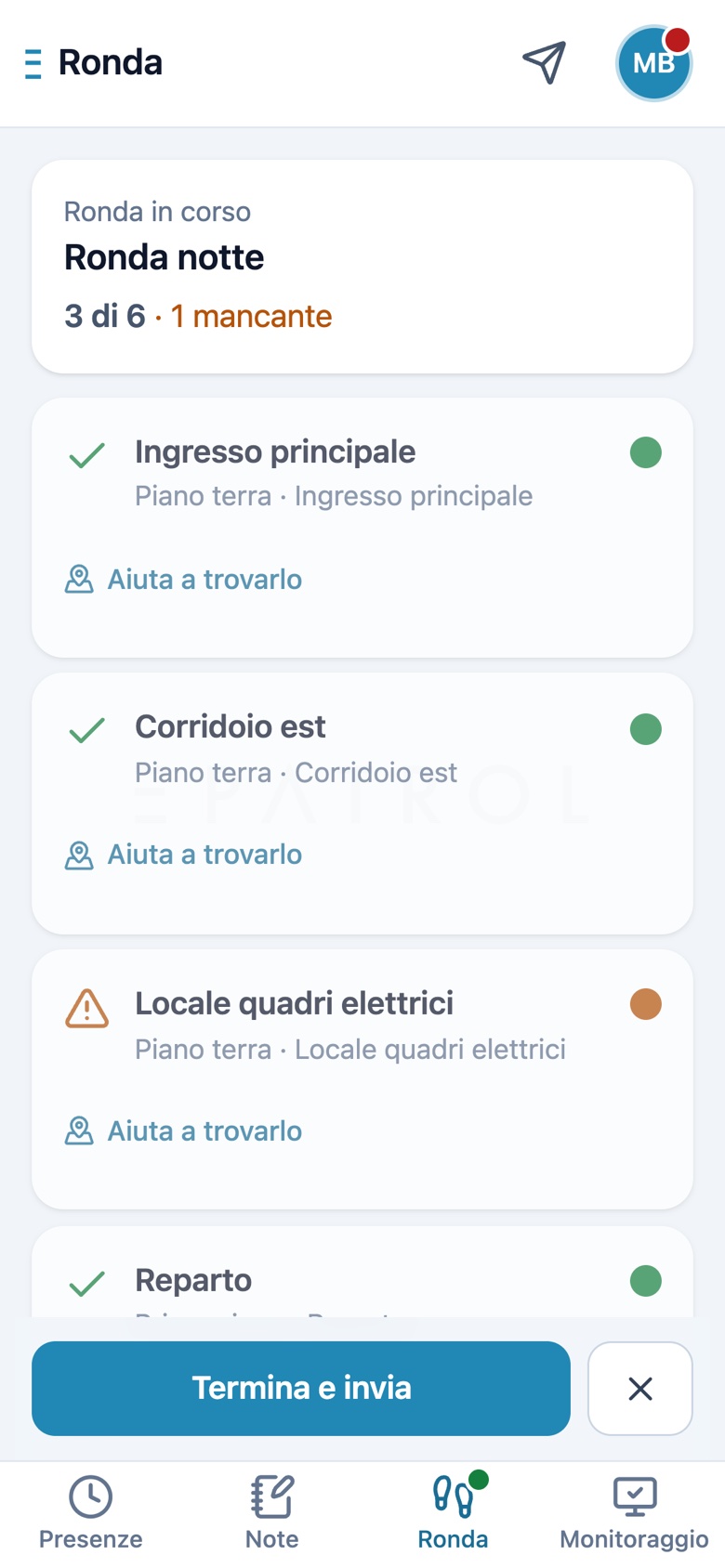
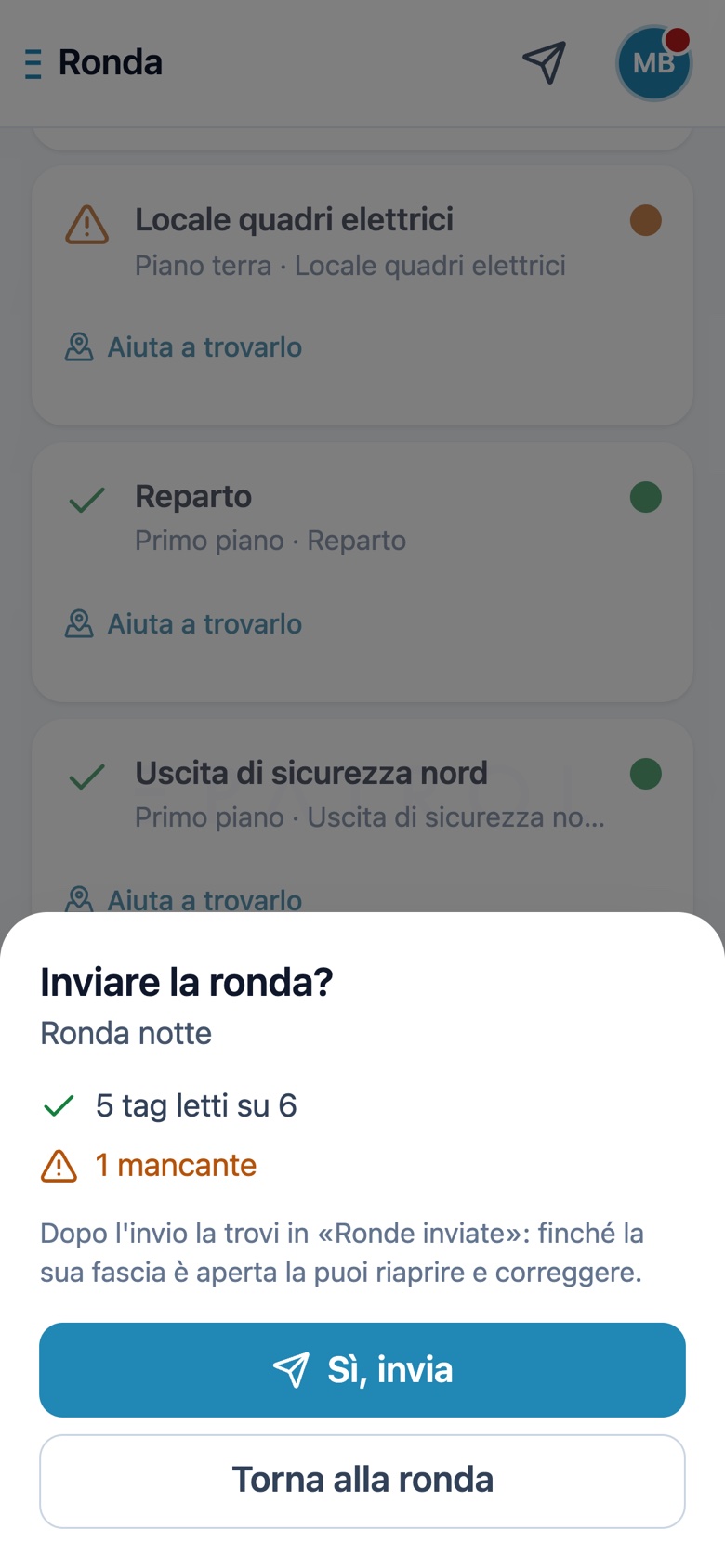
Four gestures, no training. This is what the operator sees on their phone.
- Hold the phone near the tagThe dot turns green: time and position are recorded, with nothing to type.
- A tag cannot be reached?Mark it in orange, with a note. The patrol does not stop, and the office knows why.
- Confirm and sendBefore sending you see the summary: read, not reached, still to do.
- It stays in the historyFind it under “Sent patrols” and, while the schedule allows, reopen and correct it.
Not drawings: this is what it looks like
The screens below are the product itself, running. Tap a tab to watch the office at work.
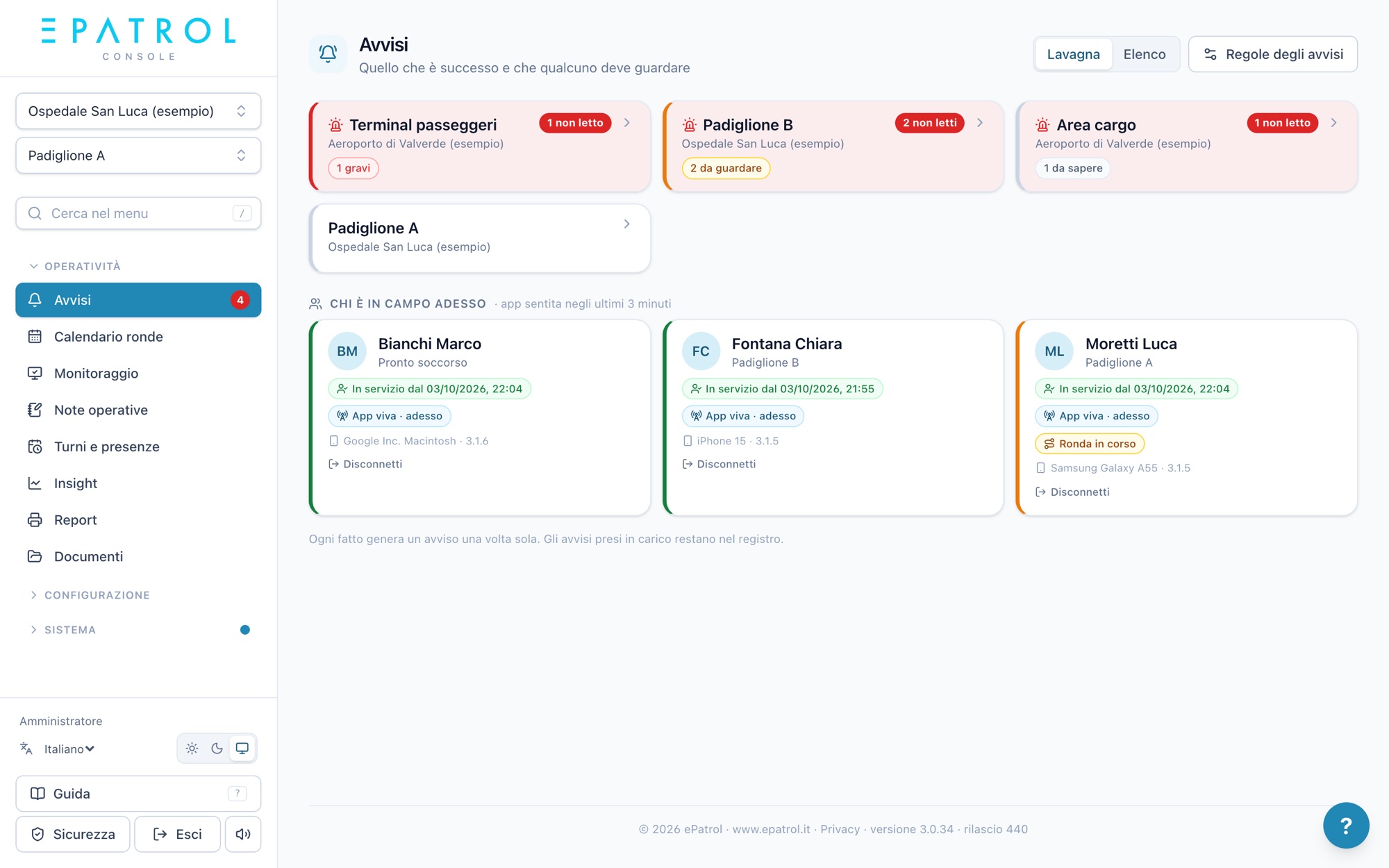
The alerts board: a tile for every site with something to look at, and below it who is in the field right now.
And on the operator's phone
Large screens, few words, everything within thumb's reach. Usable in the dark and with one hand.
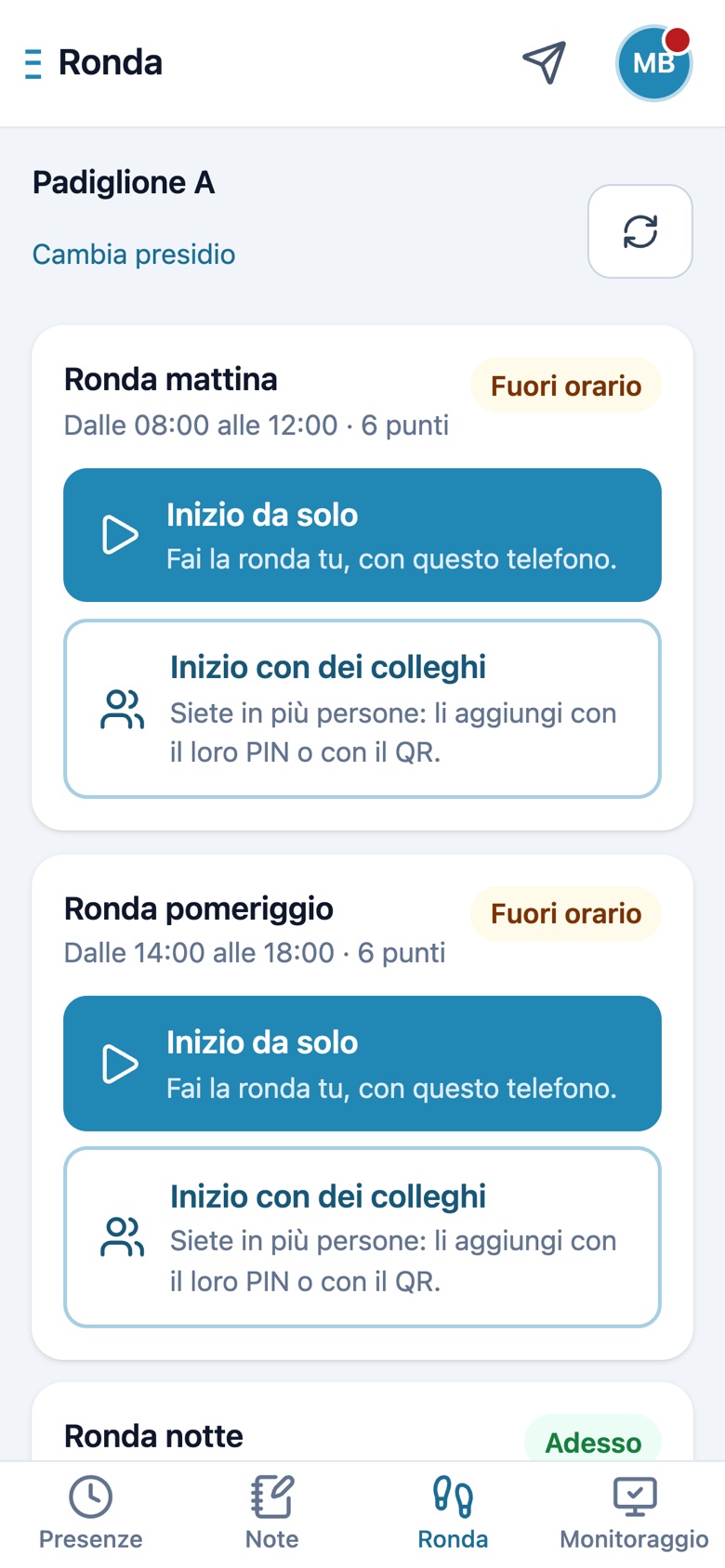
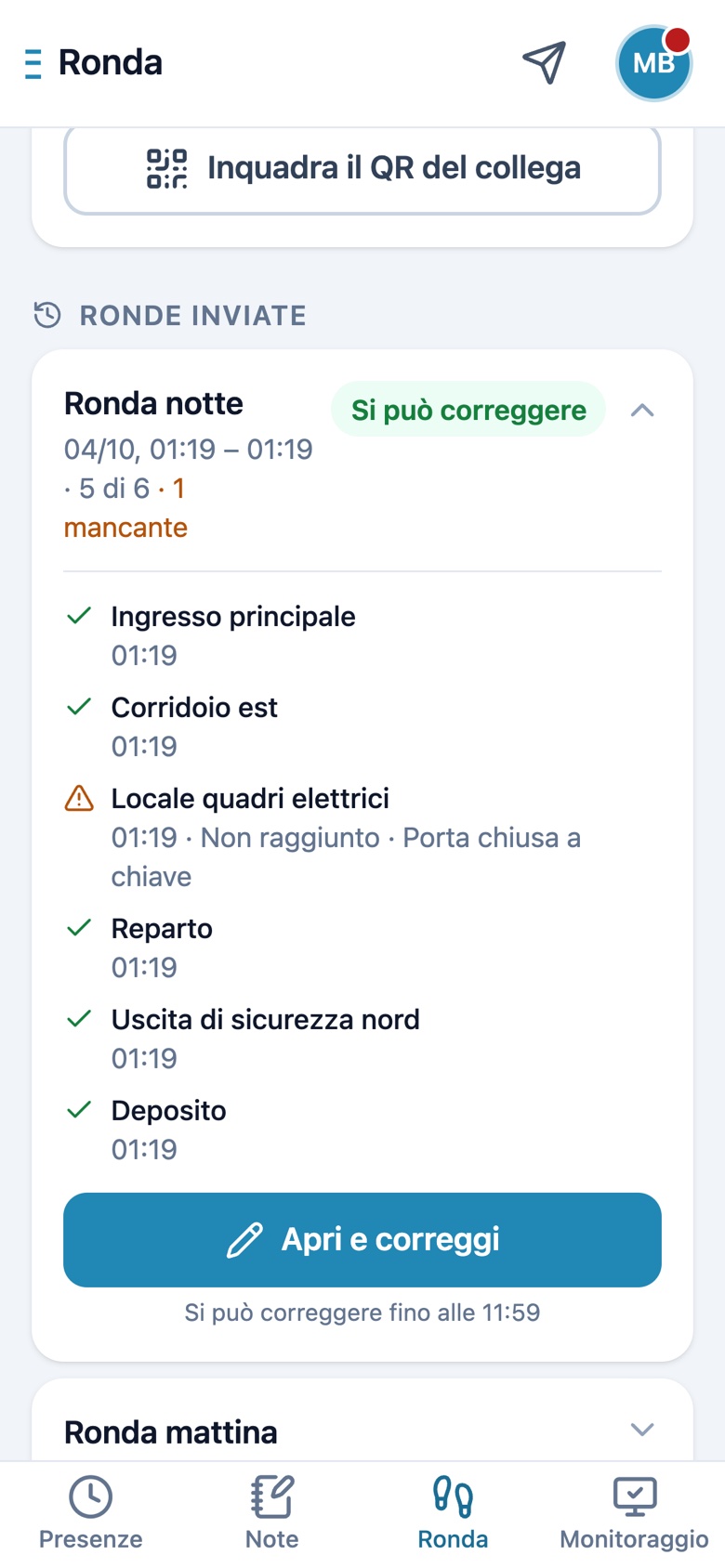
Real product screens, with a demo company: names, places and data are fictional.
All the work of a site, in one place.
NFC patrols, shifts, attendance, alerts, issues, documents and reports: one platform, the same for the office and for people in the field.
Real-time alerts
Patrol not done, uncovered shift, missing tags: the office knows within seconds, in the console, by email and on the phone.
Team patrols
Several operators carry out one patrol: each signs the points they checked, with a PIN or by scanning a QR code.
Patrol calendar
What has to be done, in which time slot, and whether it was done. Overnight patrols across midnight, missed ones justified with a reason.
Security and privacy
Servers in Europe, roles and permissions per contract, two-step verification, a log of who did what.
Just arrived
ePatrol grows every week. These are the latest things it can do.
Now on iPhone too
The same app, with the same data, on the App Store and Google Play.
History and corrections
Sent patrols stay on the phone: review them and, while the schedule allows, correct them.
Team patrols
Several phones, one patrol, with each person's signature on their points.
Sign up with a QR code
The operator scans the site code and requests an account: the office approves it.
Shifts from Excel and rotations
Import the rota you already use, or set the cycle once and let it run.
Fingerprint or face
Get back into the app without retyping the password, securely.
Overnight patrols
Time slots across midnight, counted on the right day.
“How to find this tag”
A photo and a note left by whoever has been there, for whoever covers the shift for the first time.
Paper, guard tour reader or ePatrol?
Three ways of doing the same job. Only one tells you what happened while it is happening.
| Paper and spreadsheets | Traditional guard tour reader | ePatrol | |
|---|---|---|---|
| Proof of each stop with time and position | |||
| Photos and notes on the spot | |||
| Immediate alert if a patrol is missed | |||
| Issues followed through to resolution | |||
| Shifts and clock-ins in the same place | |||
| Reports ready for the client | |||
| Works where there is no signal | |||
| No dedicated device to buy |
Indicative comparison between ways of working, not between specific products.
Where you need to prove the check was done.
Hospitals
Fire safety checks on REI doors, extinguishers, hydrants, emergency signage. Compliance reports for health authorities.
Public facilities
Airports, stations, public offices. Certified patrols for safety and scheduled maintenance.
Industrial sites
Factories, warehouses, logistics hubs. Digital traceability of all mandatory checks.
Retail and malls
Periodic checks on opening, closing, hygiene and safety controls.
Ready to digitize your safety?
Let's talk. We'll show you ePatrol in action on your real use cases.
Contact us for more info