
As perguntas mais frequentes.
Como funcionam as tags, o que acontece sem rede, que telemóveis são precisos, como começar.
Product
What is ePatrol?
ePatrol is an app to organise patrols, shifts and issue reports at security, fire-safety and concierge sites. Operators use their phone, iPhone or Android, and record each checkpoint by holding it near an NFC tag; the office follows everything from a web console, and the client can see their own data. It is developed in Italy by Revolution and used by hospitals, airports, universities and service companies.
Who is it for?
Security, concierge, fire-safety and facility management companies, and organisations that run these services in-house: hospitals, airports, universities, public bodies, industry and logistics. It works for a single site as well as for hundreds of sites spread across several contracts.
What does it include?
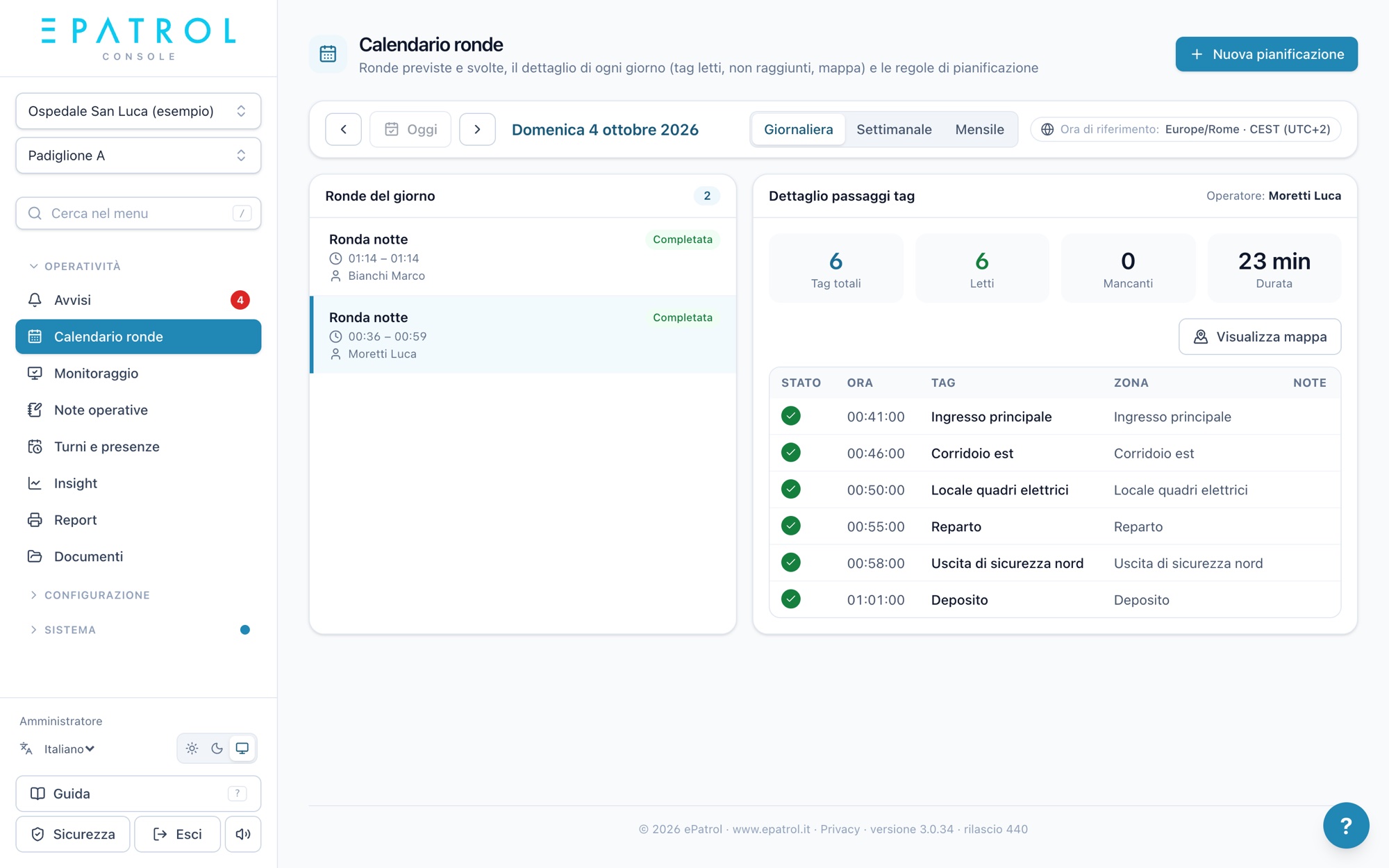
Everything is included in the fee: NFC tag patrols, team patrols, patrol calendar, shifts and attendance, real-time alerts, issue reports with photos, a page for maintainers, a document archive, PDF, CSV and Excel reports, the iPhone and Android app and the web console.
How does an NFC tag patrol work?
A small NFC tag is placed at each point to visit. The operator opens the patrol in the app, holds the phone near each tag and the point is recorded with time and position. If a point can't be reached, the operator notes the reason and moves on. At the end they see a summary and send it: the office sees the patrol in the console, even while it is under way.
In the field
Does the app work without a network connection?
Yes. Patrols, issue reports and clock-ins work even in basements and rooms with no signal: the app keeps them on the phone and sends them automatically as soon as the connection returns, with nothing for the operator to do.
Which phones are needed?
An iPhone or an Android smartphone with NFC: operators' own phones work as well as the site's service phones. There is no need to buy patrol readers or dedicated devices. The app is free to download from the App Store and Google Play.
Which NFC tags are used?
We recommend NTAG213, NTAG215 or NTAG216 tags, which are inexpensive and easy to find, as stickers or in outdoor-resistant versions. Each tag is linked to a zone of the site. If a tag breaks or comes off, an authorised operator replaces it directly from the app, without going through the office.
Can several operators do the same patrol?
Yes, with team patrols: several colleagues take part in the same patrol, each from their own phone, and each keeps the points they read. On the site's service phone, several people can also start and end their shift one after another.
Which languages is it available in?
The app is available in six languages: Italian, English, French, German, Spanish and Portuguese. Each operator uses it in their own language, even at the same site.
Office and clients
How do I manage shifts and attendance?
You set up time slots and rotations once, or import the Excel shift sheet you already use. Operators start and end their shift from the app; in the console you see planned hours next to worked hours and have summaries ready for payroll. Last-minute replacements are declared from the phone.
How am I notified if something goes wrong?
A scheduled patrol that doesn't start, a shift still uncovered, a point not reached: the alert arrives at once in the console, by email and as a phone notification, to the people you choose. That way the office can act in time.
Can the client see their own data?
Yes. The client has their own console access and sees only their sites: completed patrols, issue reports and finished work, as well as reports. They are always kept informed, with no need for phone calls.
How do maintainers work?
You decide who handles what, by site and by type of check. Each new issue reaches the right maintainer by email with a link: they open the page, take charge of it, add photos and notes and close it. They don't need an account.
Which reports can I give to the client?
A summary of patrols, issue reports and attendance for the period you choose, as a PDF with a cover and the contract's logo, or as CSV and Excel for internal analysis. Each report shows the time, point and position of each pass, and is suitable as documentation of the service provided.
Pricing
How much does it cost?
€38 a month for each active site and €3 a month for each active account, of any role, with all features included and no extra charge for the app. Each site comes with 1 GB of storage (each extra GB €1.99 a month) and each company with 10,000 API calls a month (then €1 per 1,000). Prices are public and the same for everyone: you will find them on the Pricing page, with the calculator.
How is the fee calculated?
Billing starts the following month, in whole months: a site or person added on 18 April is billed from 1 May; if archived on 18 December, they are billed until 31 December. ePatrol prepares the summary every month.
Is there a free trial?
Yes, 30 days free, with no card: you sign up with your company details and we usually activate the trial within a few hours, with up to 3 sites and 20 accounts. When you want to carry on, add a card or IBAN and activate the subscription yourself from the console: everything you have set up stays as it is.
How do I cancel?
From the console, in Settings › Plan, whenever you like: cancellation takes effect at the end of the month, which is charged in full, and until then you can withdraw it. Access then closes and the data is kept for 60 days, time to download what you need.
Security and privacy
Where is the data stored?
On servers in the European Union. Each company sees only its own data, and within the company everyone sees only what they need, based on their role and per-contract permissions.
Does ePatrol comply with the GDPR?
Yes. We process only the data needed for the service, with privacy notices for each role accepted on first access, and we delete data when the relationship ends. On request we provide privacy documentation for your legal team.
How are accounts protected?
Always-encrypted connections, two-step verification, app access with fingerprint or face, roles and per-contract permissions, and an activity log showing who did what and when.
Support
How do I get started?
We start with a demo on your own cases. Then you add contracts and sites, place tags at the points to visit and set up time slots and shifts; operators register by scanning the site's QR code in the app and the office approves them. Most customers are up and running within a few days.
Do operators need training?
The app is designed to be used without training: large screens, few words, one tap per point. For the office and coordinators we hold an online session to set everything up together.
What support is included?
Email and ticket support is included in the fee, together with continuous updates to the app and the console. Write to [email protected] or open a request from the console (Guide › Write to support): each request gets its own number and we reply by email.
Integrations
Can I import the data I already have?
Yes. Tags can be imported from a CSV file and shifts from the Excel sheet you already use. For larger migrations from other systems we agree together on how to move the data.
Can ePatrol connect to other software?
Yes, through the ePatrol API: access keys with per-section permissions and a manual for your developers, to bring patrols, attendance and issue reports into your own systems. API access is an optional extra: ask us for details.
Vamos ver juntos como o podemos ajudar?
Mostramos-lhe o ePatrol nos seus locais e nas suas rondas, sem compromisso.
Escreva-nos